This post was written in 2009. It's preserved here for historical purposes — the technical details may no longer be accurate.
🔍
2026 retrospective
This plugin relied on $.browser (removed in jQuery 1.9) and the Prototype-era trick of hiding a file input under the cursor. Modern browsers support the File API, drag-and-drop uploads, and input.click() works everywhere now – no mouse-chasing needed.
I recently wrote jQuery plug-in, that allows
AJAX file uploads without using a fixed file input button. It achieves its
goals by installing an OnMouseMove handler over the selected elements, and
moving the input button under the mouse cursor.
The quote that inspired this code is: “If Muhammad won’t go to the mountain,
the mountain will come to Muhammad”, the opposite of the more known
proverb
:).
// ~ JavaScript Kung-FU, with an excess chunky bacon dose! ~
// This plugin allows seamless ajax file uploads without having
// a fixed file input button. It achieves this by installing an
// OnMouseMove handler over the interested elements, and moving
// the input button under the cursor. <<If Muhammad won't go to
// the the mountain, the mountain will come to Muhammad.>> :-).
//
// This approach is needed on the majority of browsers, except
// Safari, on which the coder is allowed to trigger a "click"
// event onto an input type=file element. On other browsers,
// you can not, that's why the complicated mousemove approach
// was chosen.
//
// Either way, when the value of the input type=file changes,
// handlers are disabled, and a user-provided callback is then
// called (passed via the "upload" option). Handlers are then
// re-enabled again when the upload succeeds or fails.
//
// IE has additional problems, because, quite unexplicably,
// when submitting a form that causes a page load, the change
// event on the file input is triggered AGAIN, thus triggering
// a new file upload. To circumvent this, you can pass a "linked"
// option, that contains the jQuery selector of the form, and
// whenever an input under this form is hovered, ajax upload
// handlers are temporarily cleared and thus the spurious form
// submission.
//
// The jquery Form plugin is a perfect companion of this one,
// because of its .ajaxSubmit method. Have a look at its home
// page: http://malsup.com/jquery/form/.
//
// Have fun!
// - vjt@openssl.it
//
$.fn.ajaxFormUpload=function(options){varpositioning={top:0,left:0,position:'absolute',cursor:'pointer','z-index':2};varform=$(options.form||'#ajax_upload');form.css(positioning)varinput=form.find('input[type=file]');input.css($.extend(positioning,{width:'10px',opacity:0,'font-size':'0px'}));varhovering_element=null;varelements=$(this);varhandler,event_;if($.browser.safari){event_='click',handler=function(){hovering_element=$(this);input.click();};}else{event_='mousemove',handler=function(event){hovering_element=$(this);form.css({left:event.pageX-10,top:event.pageY-5});};}functionenable(){$(elements).bind(event_,handler);}functiondisable(){$(elements).unbind(event_,handler);}input.change(function(){varelement=hovering_element;if(!element)return;disable();options.upload(element,form);enable();});enable();if(options.linked){$(document).ready(function(){$(options.linked).find('input').mouseover(function(){hovering_element=null;});});}};
When you install the developer beta of Windows
7, after the
usual 3 reboots cycle, you are greeted with the following image:
It is the Siamese fighting fish, a
beautiful tropical fish, but with an interesting characteristic: it is
extremely aggressive. It is popular belief that two males fight each other even
in the wild, but that’s not quite true. This belief descends from the behaviour
of the fish in an aquarium, where the victor continuously attacks the
loser, eventually causing the loser’s death.
Now, think about the software ecosystem as an aquarium. And think about
Microsoft in this aquarium. The latest release of Microsoft OS has an
aggressive fish as its default skin, and it is alone in this aquarium. And
there’s no place for anyone else: they’ll fight whatever adversary, even if it’s
from the same species.
What’s uncertain is .. whether they’ll succeed, or not? :). We’ll see!
This post was written in 2008. It's preserved here for historical purposes — the technical details may no longer be accurate.
🔍
2026 retrospective
Apple removed AU Lab from Xcode/developer tools around 2019, and Soundflower was abandoned by Cycling ‘74 (acquired by Ableton). The modern replacement is BlackHole — a virtual audio driver that does the same job.
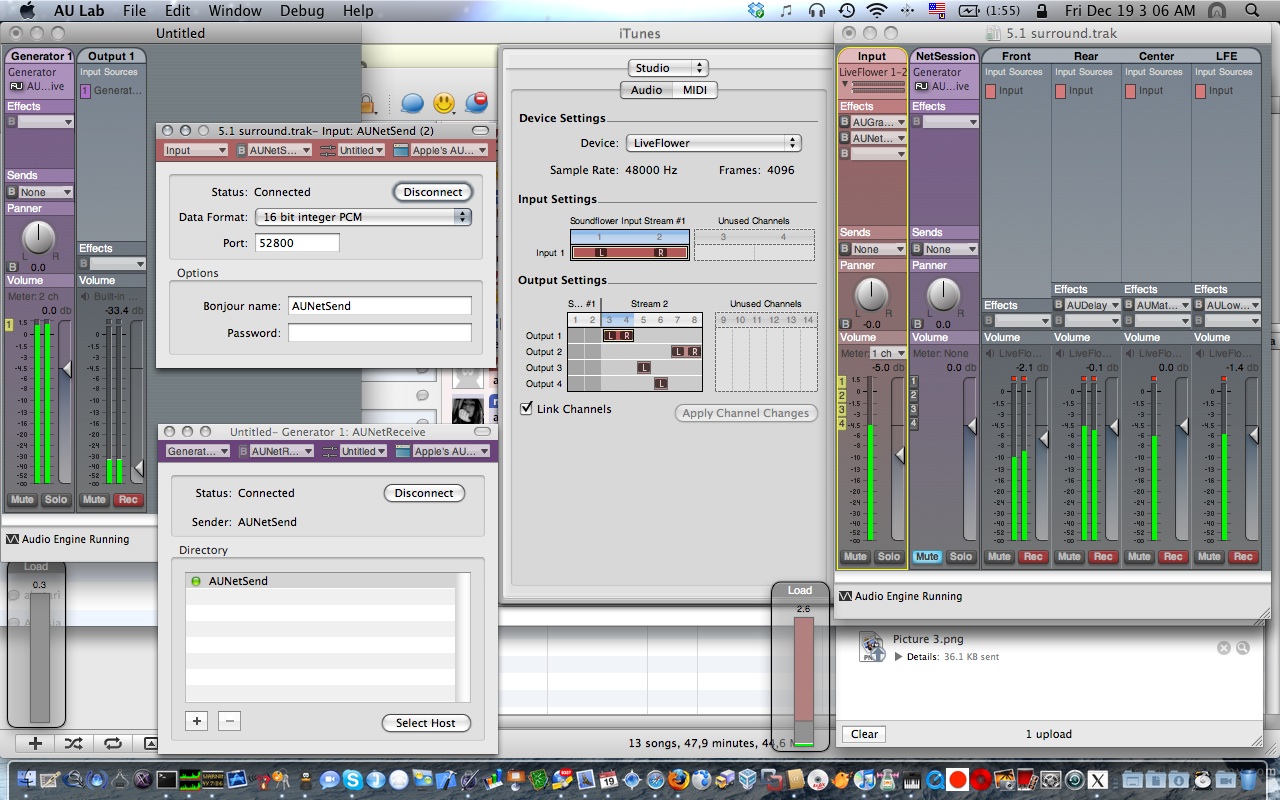
The right session shows a document open on an aggregate audio device between soundflower (2ch) and a Creative SBLive with 6 channels: the flower receives sound input from iTunes and routes it to the card channels, using all the 6 speakers.
Effects have been added to improve the audio experience (details here: http://www.rottenbrains.com/?p=232). The right session also uses AUNetSend to stream audio onto the left session, connected to the built-in speakers of the macbook.
Result: stereo audio being played on eight channels. Audio Units are a really powerful instrument, well coded and well working.
[tks nextie for telling me about AUNetSend and AUNetReceive]
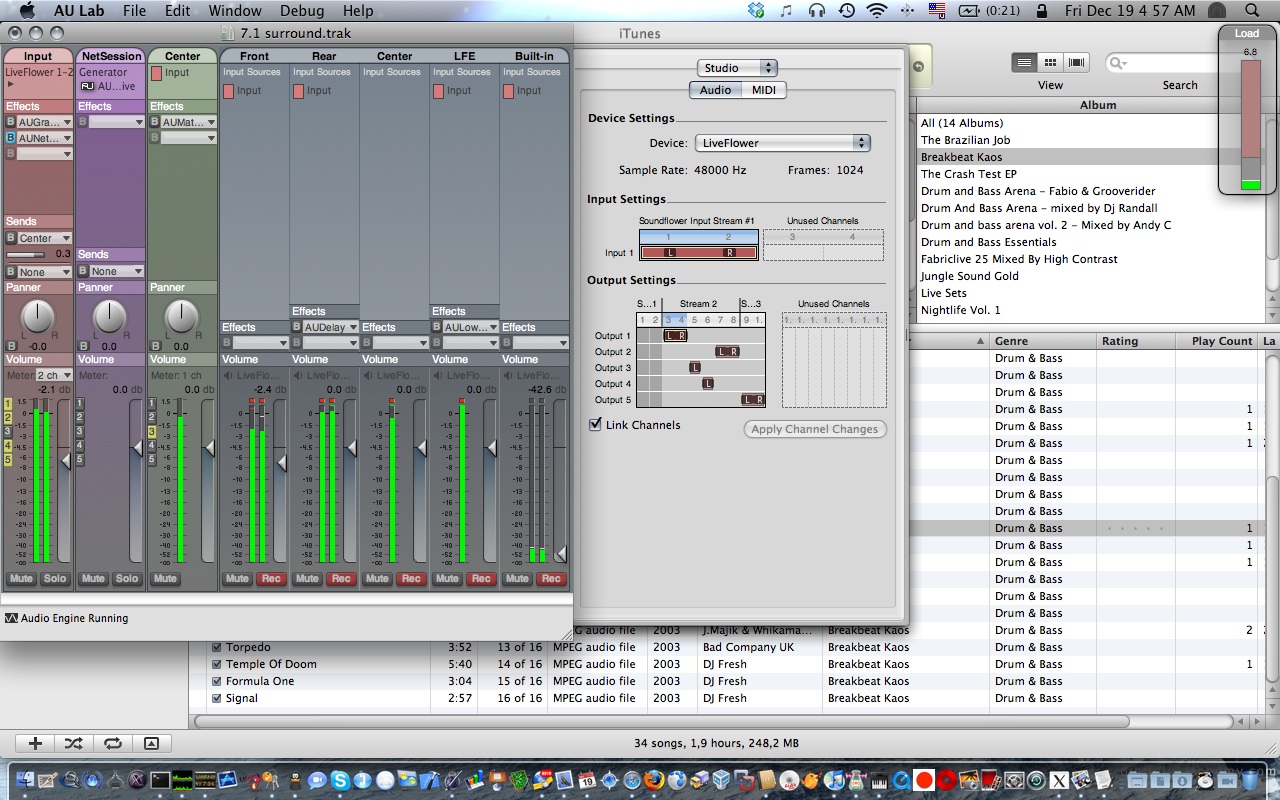
Improving: there is no need to use NetSend and NetReceive to play on 8 speakers: an aggregate device composed of Soundflower 2ch, the USB 6ch SBlive and the Built-in output is enough!
Also, note the new bus: it’s required because the AUMatrixReverb effect added to the center channel to improve the audio stereophony actually takes two channels, so it overlaps with the following one (the LFE). But applying the effect to a bus does not exhibit this side effect.
This post was written in 2008. It's preserved here for historical purposes — the technical details may no longer be accurate.
🔍
2026 retrospective
This turned out to be terrifyingly accurate. The “slightly altered personality” is now called your “personal brand” and it’s mandatory for professional survival. Cambridge Analytica proved that user data can shape elections. Instagram and TikTok made the “act of being observed changes behavior” effect orders of magnitude worse. ReadWriteWeb itself shut down in 2012 — link now points to the Wayback Machine.
Exactly the words that run around my mind these days:
When we reach the point where online anonymity has ended, instead of getting
to be who we really are, the fact that we’ve become so aware of the fact that
we’re always being recorded, photographed, tracked, and traced, will have
actually created a slightly altered personality instead. Like reality TV show
contestants, the act of being observed will change our behavior. Our personal
brand image will become our public identity and therefore our identity.
I think these words describe exactly the “facebook effect”.
This post was written in 2008. It's preserved here for historical purposes — the technical details may no longer be accurate.
🔍
2026 retrospective
Apple replaced the MIT Kerberos implementation with Heimdal in OS X 10.7 Lion (2011), removing CCacheServer entirely. On modern macOS, System Integrity Protection (SIP, since 10.11 El Capitan) prevents editing anything under /System/Library/ anyway.
If you’re wondering why the CCacheServer daemon, that caches in memory
Kerberos tickets obtained via kinit(1) is NOT starting .. that’s because of a
strange bug regarding the LimitLoadToSessionType specified in the agent
.plist, located into
/System/Library/LaunchAgents/edu.mit.kerberos.CCacheServer.plist on OSX 10.5
systems.
CCacheServer will then be instantiated when you do a kinit:
$ kinit
Please enter the password for vjt@DOMAIN.LOCAL:

$ klist
Kerberos 5 ticket cache: 'API:Initial default ccache'
Default principal: vjt@DOMAIN.LOCAL

Valid Starting     Expires            Service Principal
11/12/08 20:59:35  11/13/08 06:59:14  krbtgt/DOMAIN.LOCAL@DOMAIN.LOCAL
    renew until 11/19/08 20:59:35
The bug is strange because the LimitLoadToSessionType key actually should
instruct launchd to automatically start up the daemon and run it once for
every logged in
user,
when kinit asks its services. But, if the key is set in the .plist, a
launchctl load on it fails with “nothing found to load”. Weird!
This post was written in 2008. It's preserved here for historical purposes — the technical details may no longer be accurate.
🔍
2026 retrospective
Lighthouse (the project tracker by ENTP) shut down in 2012, and its GitHub integration is long gone. If you’re looking for commit-to-issue linking, every modern platform (GitHub Issues, GitLab, Jira, Linear) does this natively.
If you use github-provided lighthouse integration, from the “Admin” pages of
your git repository, you may have stumbled upon a glitch: every changeset on
lighthouse appears as done by the lighthouse user that configured the
integration on github.
This happens because lighthouse uses the API token to link changeset authors to
LH users, and that’s not good when you’re not alone committing :-).
A simple solution is to use a post-commit hook, as described
here,
but that’s not satisfactory because it means that every time you issue git
commit on your console, the commit message will go public, and if you --amend
or reset --soft the index you’ll have to browse to lighthouse and delete the
changeset.
A much smarter solution is to push all changed revs when pushing them to
github: I modified the original post-commit
hook and installed it alongside the git
command in $(dirname which git)/git-lh.
This gives me a new git lh command that fetches the current HEAD revision
from github using refs/heads/master and POSTs every changeset between that
rev and the current tip in the working tree to lighthouse.
So, if you issue git lh before issuing git push, every change you’re
pushing to github will go to lighthouse, too.
UPDATE: A simple bash script like:
#!/bin/bash
git lh && git push
saved as git-lh-push saves you from typing two commands when you want to push
:).
When things in your life seem almost too much to handle, when 24 hours in a day
are not enough, remember the mayonnaise jar and the 2 glasses of wine.
A professor stood before his philosophy class and had some items in front of
him. When the class began, he wordlessly picked up a very large and empty
mayonnaise jar and proceeded to fill it with golf balls. He then asked the
students if the jar was full. They agreed that it was.
The professor then picked up a box of pebbles and poured them into the jar. He
shook the jar lightly. The pebbles rolled into the open areas between the golf
balls. He then asked the students again if the jar was full. They agreed it
was.
The professor next picked up a box of sand and poured it into the jar. Of
course, the sand filled up everything else. He asked once more if the jar was
full. The students responded with a unanimous “yes!”
The professor then produced two glasses of wine from under the table and poured
the entire contents into the jar effectively filling the empty space between
the sand. The students laughed.
“Now,” said the professor as the laughter subsided, “I want you to recognize
that this jar represents your life. The golf balls are the important things –
your family, your children, your health, your friends and your favorite
passions – and if everything else was lost and only they remained, your life
would still be full. The pebbles are the other things that matter like your
job, your house and your car.”
This post was written in 2008. It's preserved here for historical purposes — the technical details may no longer be accurate.
🔍
2026 retrospective
Eighteen years later, I wrote a retrospective on what we built, why we were too early, and who’s doing it today. The full technical deep-dive is in the 2010 series.
Today we released the output of 9 months of hard work: myousica.com, a social networking site for musicians. Have a look at the promo video and check out the site. Have fun! :)
UPDATE 2009/02/23: The site is now paused.
UPDATE 2010/10: The source code has been released on GitHub under the name Mewsic.
2026 retrospective
Context for younger readers: in the mid-2000s, “Chuck Norris facts” were an absurdly popular internet meme — an endless list of hyperbolic jokes about the actor’s supposed invincibility (“Chuck Norris can divide by zero”). Naturally, someone had to implement them in Ruby. intinig’s blog is gone, but the GitHub repo is still up — a ChuckNorris class that refuses to be instantiated (“No one initializes Chuck Norris”) or subclassed. The best part: if you try, it walks ObjectSpace and nils every instance of your class. Roundhouse kick to the entire Ruby runtime.
intinig ported
Chuck’s roundhouse kick
power to Ruby! Have a look…