2026 retrospective
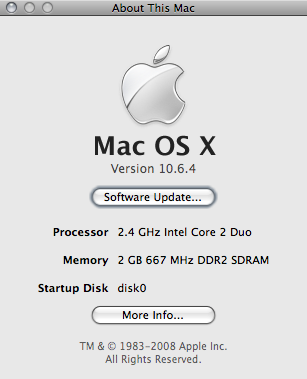
The joke: Apple had just announced Snow Leopard (Mac OS X 10.6) at WWDC 2008, over a year before its actual release in August 2009. On a Mac, the “About This Mac” version string is stored in a plain text plist file (/System/Library/CoreServices/SystemVersion.plist). Edit it, reopen “About This Mac,” and congratulations — you’re running an OS that doesn’t exist yet. Apple has since made this file read-only on modern macOS via System Integrity Protection.
And this is the proof:
(Of course, if you know about SystemVersion.plist, skip this entry ;)
A friend of mine told me that on techie
blogs there is a new meme going on: show off the most used commands, starting
from shell history:
history|\
awk '{a[$2]++}END{for(i in a){print a[i] " " i}}'|\
sort -rn | head -15
I’ve got 20 times the default bash history size (10k lines), so it’ll yield
interesting results. I also use the history timestamp feature, so I’ve added a
little sed to the code in order to strip timestamps out.
Let’s see:
vjt@voyager:~/code*$*history| sed 's#^[ 0-9\[\/\:]*\]\([^ ]*\).*#\1#'| awk '{a[$1]++}END{for(i in a){print a[i] " " i}}'| sort -rn | head -15
928 l
577 ssh
389 ping
381cd300 dig
259 telnet
153 sudo
126 ifconfig
125 whois
113 ps
96 svn
91 cat
73fg68 vi
61 ..
Yeah, I do a LOT of ls, l is actually ls -alFGs (I’m on Darwin). This list
exposes my recent habits, because I’m coding less and managing more (no gcc, no
irb, lots of dig & whois). svn is still there, of course ;). ssh means that
these results should be aggregated with other histories coming from the other
boxes I log on to.. but that’s a topic for another post ;).
This post was written in 2008. It's preserved here for historical purposes — the technical details may no longer be accurate.
🔍
2026 retrospective
LightWindow is long dead – it was a Prototype.js-era modal library that vanished around 2010. If you need modals today, the <dialog> HTML element does the job natively.
Well, this is the result of 2 days of head-banging with lightwindow:
Index: public/javascripts/lightwindow.js, line 444
_removeLink:function(removed){// remove it from the links array
//
this.links=this.links.reject(function(link){if(link==removed.href)returntrue;});// remove it from the gallery links array
//
if(gallery=this._getGalleryInfo(removed.rel)){klass=gallery[0];name=gallery[1];if(this.galleries[klass]&&this.galleries[klass][name]){this.galleries[klass][name]=this.galleries[klass][name].reject(function(link){if(link==removed.href)returntrue;});}}},
Call this function from your .rjs template, something like this:
Well, it seems that I’ve got no reason to be paranoid about my age: I still can
do inline like I did (everyday) when I was a bit younger :).
On international workers day, 1st of May, Sam literally carried me out from
home, far from the computer, and we went skating. It’s been an awesome day,
we skated a lot, and shot some nice photos.
But the real good ones have been shot when ndstr caught
us. He is by far the best photographer you could meet, and of course my
favorite one (take a look at his site!).
He’s been also a skater, so he knows very very well how and when to shoot in
order to take out the most from your tricks :). Here are two of them,
portraying me and Sam while doing our best!
It was fun. Really fun. Thank you Sam for taking me out of home :D.
This post was written in 2008. It's preserved here for historical purposes — the technical details may no longer be accurate.
🔍
2026 retrospective
The single-user mode recovery (Cmd-S, fsck, mount writable) described here no longer works on modern Macs. Apple removed single-user mode in macOS Catalina (2019), the system volume became read-only with Signed System Volume in Big Sur (2020), and Apple Silicon Macs use a completely different recovery architecture.
Well, I’m really happy with OSX 10.5.2. Even though I’m not the one that blamed Apple
for the translucent menu bar that everyone dislikes.. well, I like it. I don’t
care about the TM menu bar tool, because I haven’t bought (yet) the nifty Time
Capsule, I like the spinner in the Airport menu and, most of all, I really like
the updates to the BluetoothSCOAudioDriver.kext that drives my bluetooth
headset.
Spotlight also feels faster and faster on every upgrade, and I’m a heavy
spotlight user, so this makes me really happy. Thanks Apple engineers!
Back to the topic: why odyssey? Because as per my battery
hints, I managed
to make my MacBook2,1 SHUT DOWN while at 74% of the “Writing files” phase of
the combo update… resulting in a completely broken system, as every geek
could imagine :). Apple updated some libraries, and upon reboot simply nothing
worked, and the darwin console was filled with lots of error messages.
The standard apple fanb^Wuser would have simply archived and installed his
system, but hey, I’m a proud geek! I know from experience that disaster
recovery situations are the best ones to learn something about an operating
system, because you have to help the system boot up, bringing services up by
hand, and find some way to re-apply the combo update without using the easy
Aqua interface.
This post was written in 2008. It's preserved here for historical purposes — the technical details may no longer be accurate.
🔍
2026 retrospective
This advice is now the opposite of what Apple recommends. Modern lithium-ion batteries degrade faster from deep discharge cycles. Since macOS Catalina (2019), “Optimized Battery Charging” stops at 80% automatically. Apple recommends keeping your MacBook plugged in when possible and removed the “calibrate by full discharge” guidance around 2012.
3 simple rules:
DO NOT leave your charger connected when the battery is charged, even when
you go to sleep.
DO let it discharge completely, when using it wait till it reaches 0%, when
sleeping it leave it alone, when you’ll wake up and you’ll open it, a resume
from suspend to disk will greet you. OSX FTW.
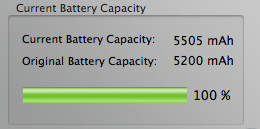
Monitor it and show off OSX performance counters to your friends (images
courtesy of
CoconutBattery.app and System
Profiler.app)
This post was written in 2008. It's preserved here for historical purposes — the technical details may no longer be accurate.
🔍
2026 retrospective
Sun was acquired by Oracle in 2010 and Solaris is effectively abandoned since Oracle gutted the team in 2017. Python 2.4 and urllib2 are long gone — urllib2 was merged into urllib.request in Python 3.
While happily installing prerequisites to build an app on Solaris
11, i enjoyed having
Mercurial already installed in the base
system.. except for a BIG issue: digest authentication was broken. I
tcpdump’ed the traffic exchanged between the mercurial client and the CGI
server and I saw that no Authorization header was sent, and obviously the
server refused to serve the hg repository.
Before reinstalling python, maybe from source and replacing the default
installation or having side by side two different versions, with consequent
nuisances and dirt around the system, I tried a very very small patch to
urllib2.py that… amusingly enough, fixed my problem:
I’m no fscking python expert (but the language is interesting), so don’t ask me
WHY it works, i simply followed the add_header comment that said “this method
is useful for adding authentication headers” and replaced the
unredirected_header method with the former. I really don’t know why with
Python2.5’s urllib2 “everything works” even with that method, something must be
broken somewhere else. A diff between the two urllibs gave me nothing, I really
should learn Python one day or another.
This post was written in 2008. It's preserved here for historical purposes — the technical details may no longer be accurate.
🔍
2026 retrospective
The Gibberish plugin and this entire approach are long dead. Rails 2.2 (2008) added built-in I18n support, and since Rails 3 the standard way is config/locales/*.yml with the i18n gem. ActiveRecord error messages, field names, and all UI strings are handled natively — no plugins, no monkey-patching.
UPDATE: you don’t need this code, because starting from the 2.2 version of Rails, localization support is built-in.
Today I had to answer one of the questions every non-English Rails developer
stumbles upon sooner or later.. how to localize AR error messages for pleasant
appearance to a non-english customer ;).
First off, thanks to defunkt’s excellent gibberish
plugin and to the way AR validation errors are exposed, the task was
accomplished in an easy and clean manner, without messing too much with AR’s
internals.
I started by translating every default AR error message, with this translation
file located in lang/it.yml:
# Active Record errors#ar_accepted:"deve essere accettato"ar_not_a_number:"non è un numero"ar_blank:"è un campo obbligatorio"ar_empty:"è un campo obbligatorio"ar_inclusion:"non è nella lista dei valori validi"ar_too_long:"è troppo lungo (massimo %d caratteri)"ar_exclusion:"è riservato"ar_too_short:"è troppo corto (minimo %d caratteri)"ar_invalid:"non è valido"ar_wrong_length:"è errato, dovrebbe essere di %d caratteri"ar_confirmation:"non corrisponde"ar_taken:"esiste già"# This one is not a default key, but I use it in my validationsar_greater_zero:"deve essere maggiore di zero"
The first one simply sets Italian (:it) as the default language, the inject
builds a new error_messages hash using Gibberish to translate the default ones.
I named every AR error key in my translation file with an “ar_” prefix, in
order to avoid possible future key clashes. Finally, AR array is overwritten
with the new one freshly built.